The plain-language savings & dividend tracker
Know what you have, what you receive, and what to do next.
Steady Ledger puts every account on one calm page, sorted by how each one is protected. It keeps a clear record of the interest and dividends you actually receive, and helps you plan what comes next.
An Excel workbook you own, with a plain-language guide beside it. No bank logins, no subscription, no jargon.
- One payment, US$27
- Instant download
- 30-day refund
- Excel, Google Sheets or Numbers


Real screenshot of the workbook, filled in with a fictional example household
Does any of this sound familiar?
You couldn’t give your total without opening five statements.
You’re not sure which accounts are actually insured, or up to how much.
Dividends get reinvested, and you’ve lost track of what you really received.
You know the cash sitting in checking should probably be doing something, but you’re not sure what.
You don’t need to become an expert. You need a clear record, and plain answers to three questions.
How it works
One workbook, three plain questions
What do I have?
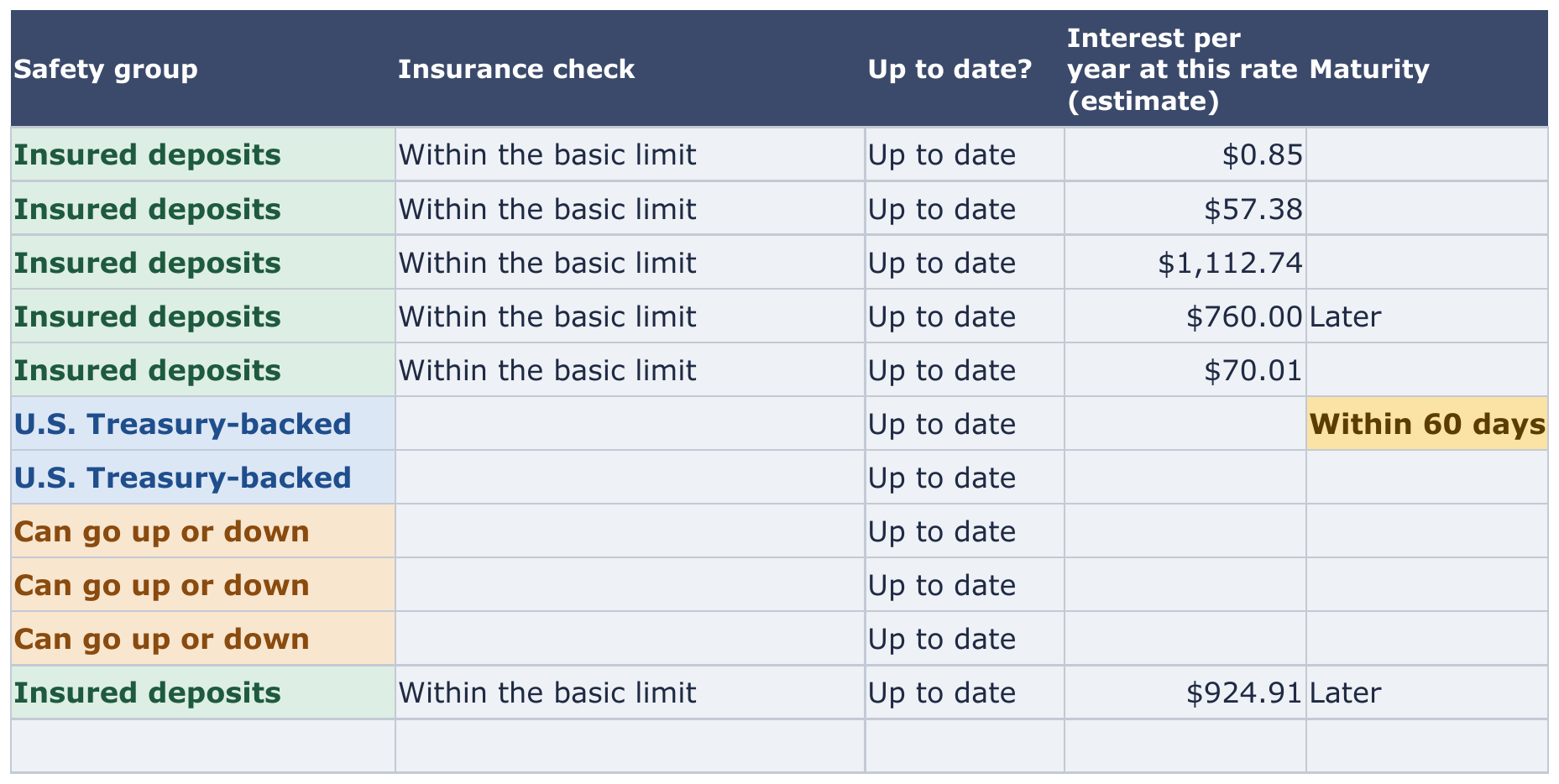
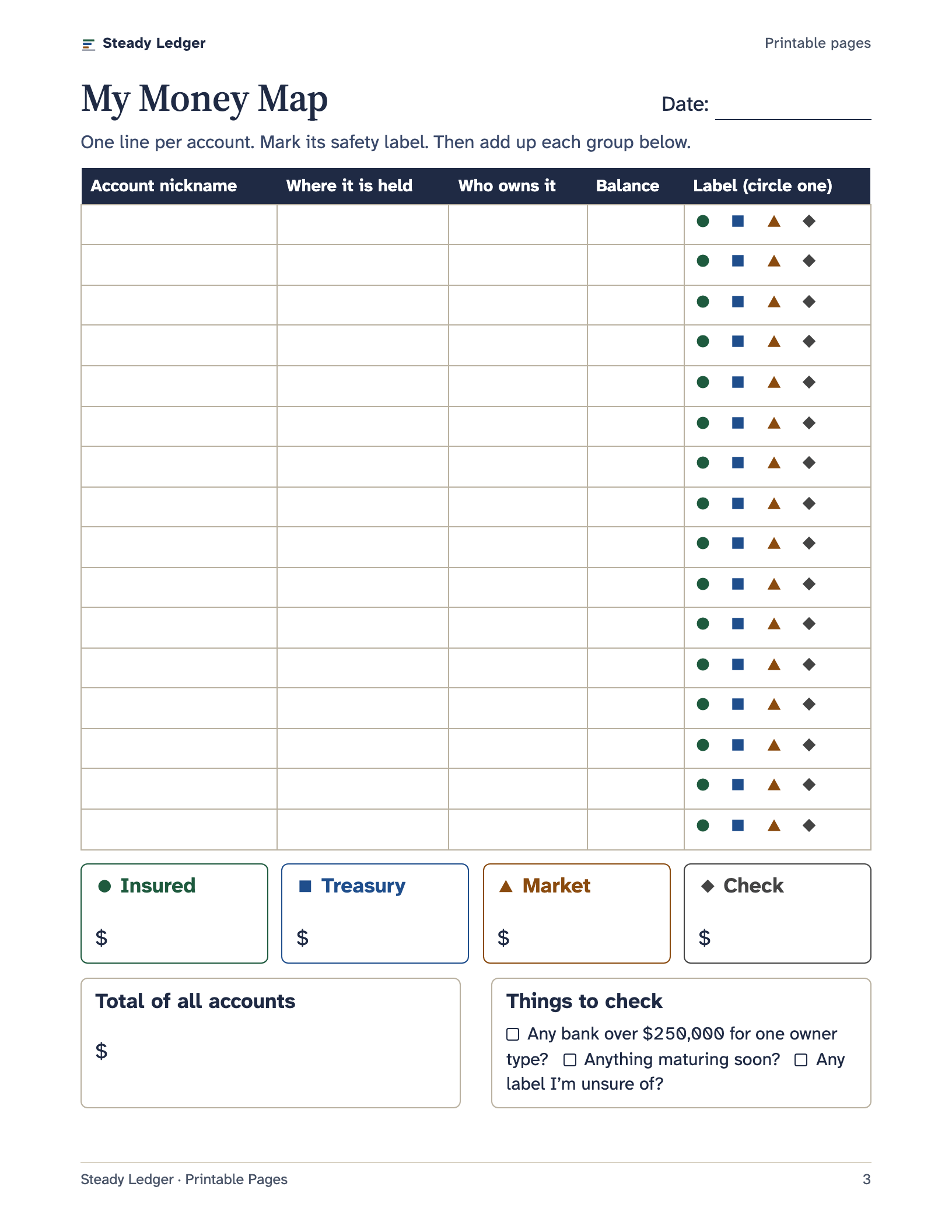
List each account once, in plain words. Steady Ledger gives it a safety label automatically and adds everything up on your Money Map.
- Insured deposits, U.S. Treasury-backed or Can go up or down, so you can see your mix at a glance.
- An insurance check that adds up deposits at each bank by owner type and flags anything over $250,000.
- Reminders for balances that are out of date, and CDs or Treasury bills maturing in the next 90 days.
Choose an account above to see its safety label.
What am I receiving?
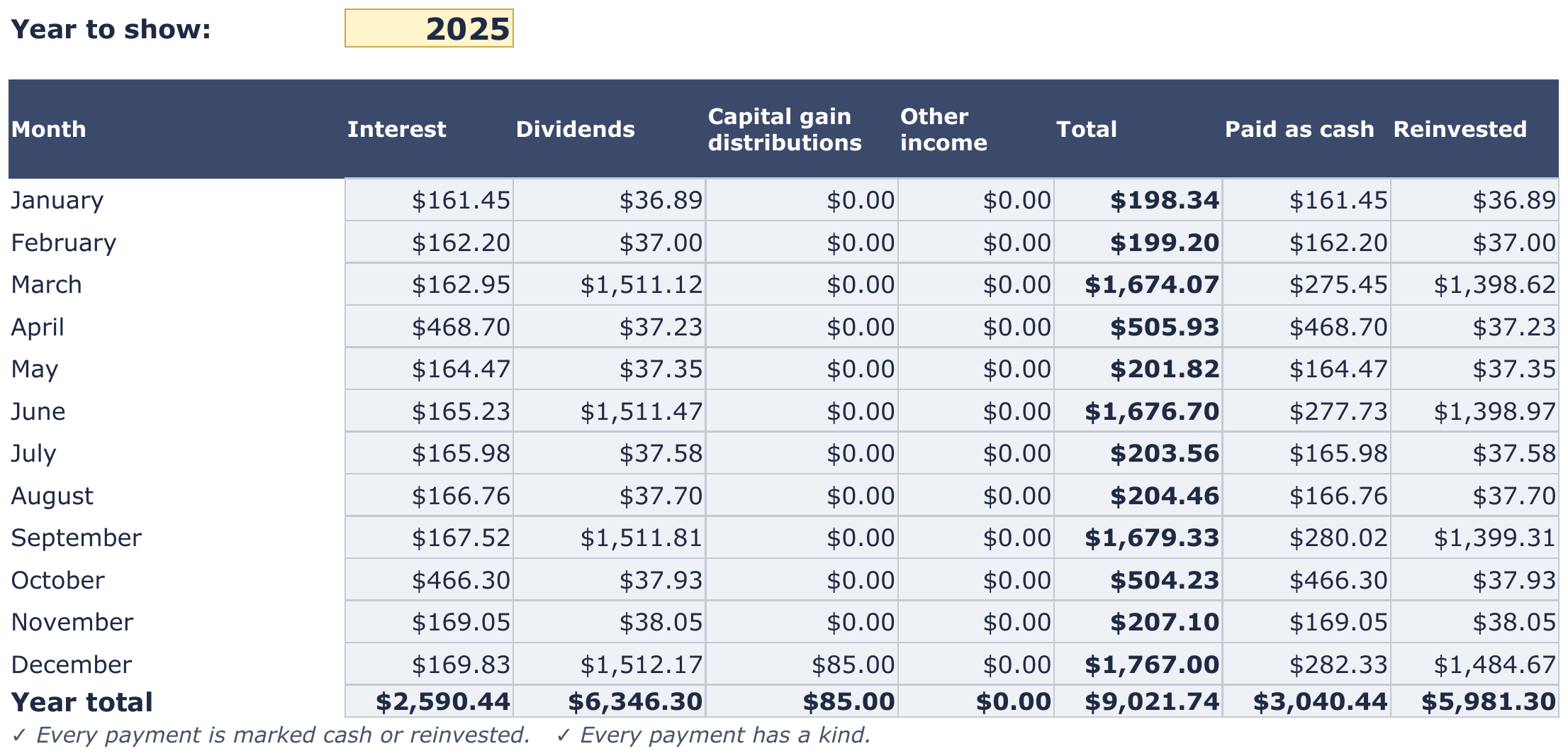
Log each interest or dividend payment once, marked paid as cash or reinvested. Nothing is counted twice, and nothing is guessed.
- The last 12 months at a glance: what came in as spendable cash, and what was reinvested.
- A Year Summary by month and by account, with totals to cross-check your 1099 tax forms.
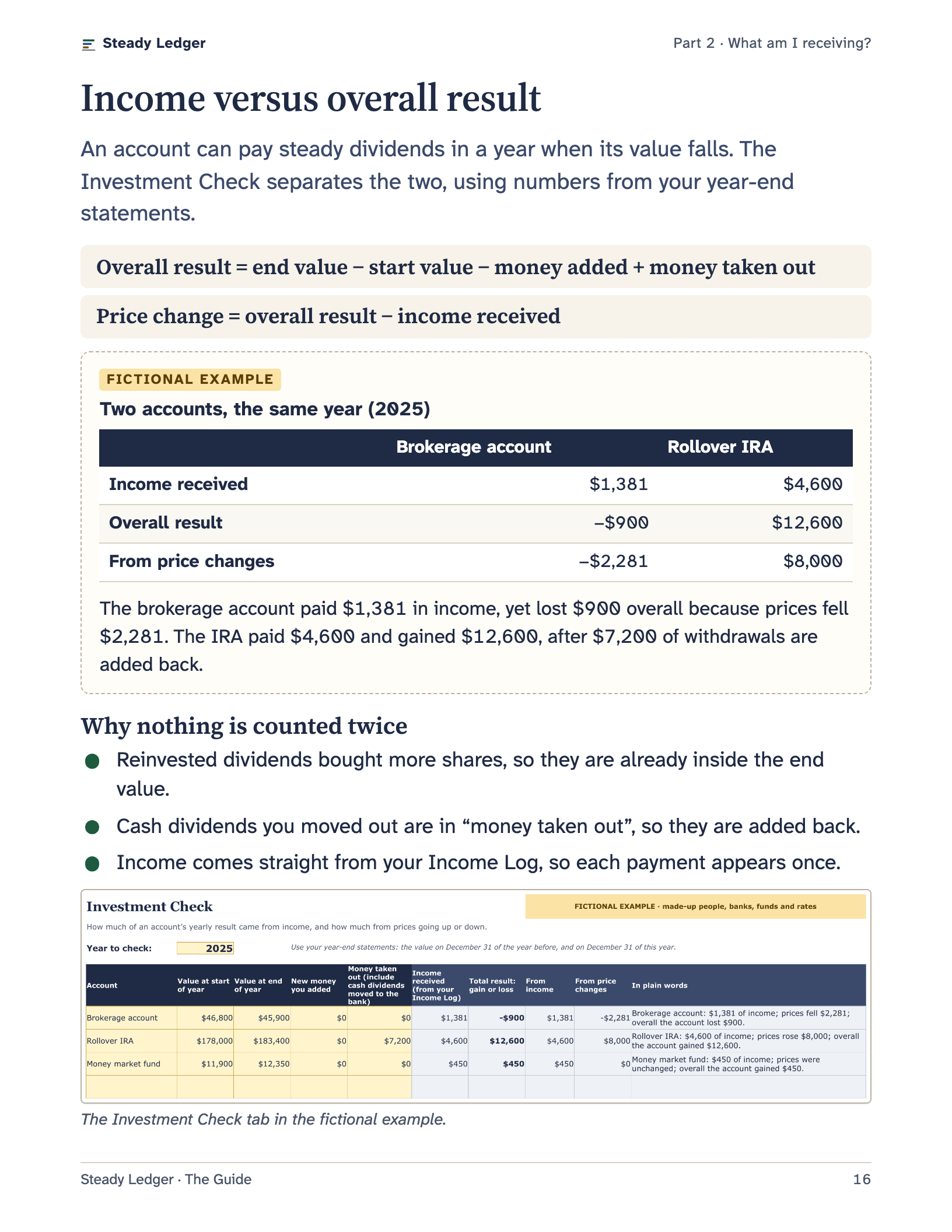
- An Investment Check that shows how much of an account’s year came from dividends and how much from prices moving.
- Dividend estimates kept strictly apart from money actually received.

What should I do next?
Turn intentions into numbers, and learn the questions worth asking before you move money.
- Goals: up to eight, each with the monthly amount it needs to arrive on time, plus an emergency-fund helper.
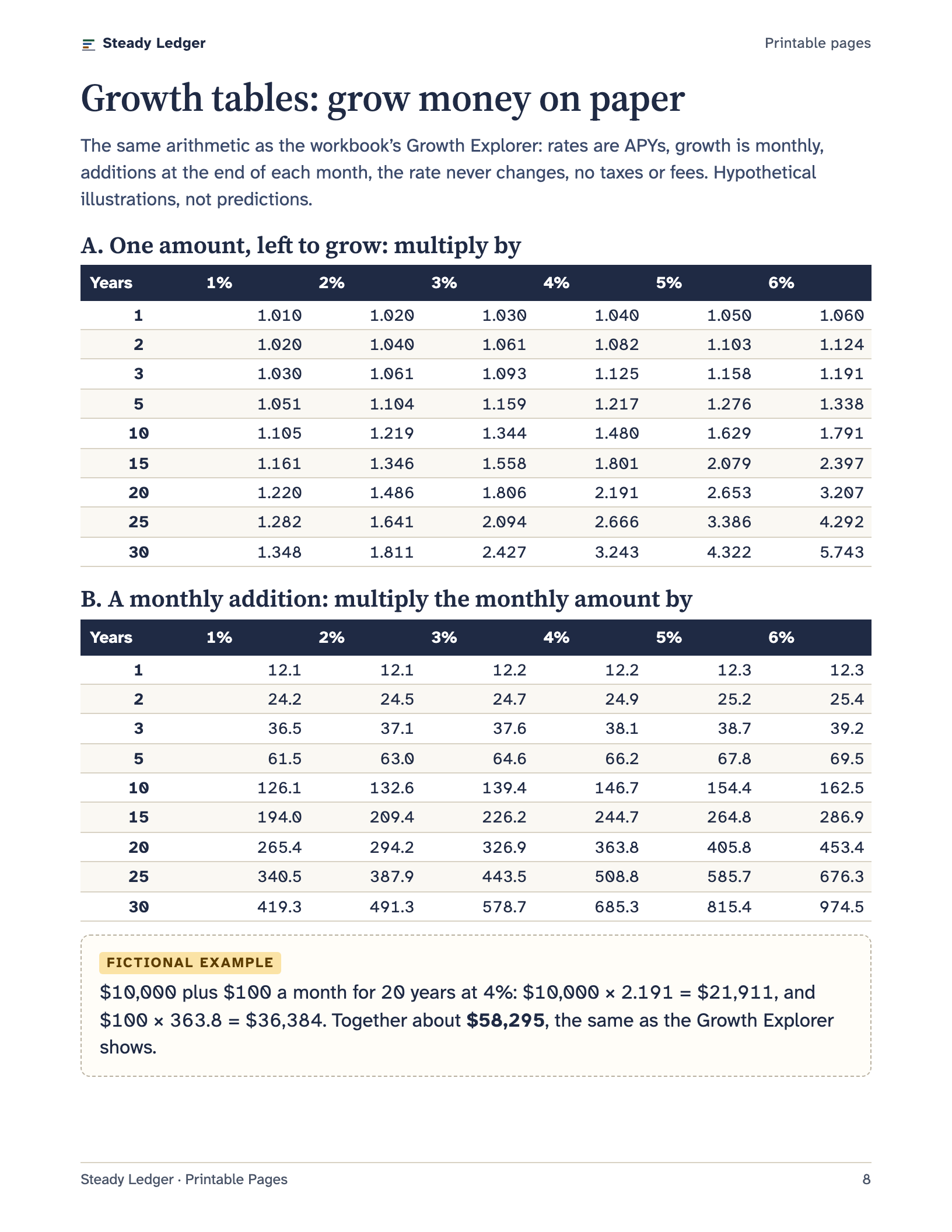
- Growth Explorer: see how a balance could grow at a rate you choose, side by side with a second rate.
- Checklists for comparing options, spotting red flags, and a 15-minute monthly routine.

Try it here
The Growth Explorer
Change any number. This is the same calculation as tab 4 of the workbook.
After 20 years at 4%
$58,295
At 0.5%
$36,282
Difference
$22,014
- Rate A (4%)
- Rate B (0.5%)
- What you put in
- Total you put in$34,000
- Growth at rate A$24,295
- Doubling time at rate A (Rule of 72)about 18.0 years
- Rate A balance in today’s dollars
A hypothetical illustration, not a prediction or an offer. Rates are yearly percentage yields (APY); each month grows by the monthly rate that adds up to the APY over a year. The rate never changes, and taxes, fees and inflation are left out unless you add inflation. Real rates change, and investments can lose value.
Show the numbers year by year
| Year | You put in | Rate A | Rate B | Difference |
|---|---|---|---|---|
| 0 | $10,000 | $10,000 | $10,000 | $0 |
| 1 | $11,200 | $11,622 | $11,253 | $369 |
| 2 | $12,400 | $13,309 | $12,512 | $797 |
| 3 | $13,600 | $15,063 | $13,777 | $1,286 |
| 4 | $14,800 | $16,887 | $15,049 | $1,838 |
| 5 | $16,000 | $18,784 | $16,327 | $2,458 |
| 6 | $17,200 | $20,758 | $17,611 | $3,147 |
| 7 | $18,400 | $22,810 | $18,902 | $3,908 |
| 8 | $19,600 | $24,944 | $20,199 | $4,745 |
| 9 | $20,800 | $27,164 | $21,503 | $5,661 |
| 10 | $22,000 | $29,472 | $22,813 | $6,659 |
| 11 | $23,200 | $31,873 | $24,130 | $7,743 |
| 12 | $24,400 | $34,370 | $25,453 | $8,916 |
| 13 | $25,600 | $36,966 | $26,783 | $10,183 |
| 14 | $26,800 | $39,667 | $28,120 | $11,547 |
| 15 | $28,000 | $42,475 | $29,463 | $13,012 |
| 16 | $29,200 | $45,396 | $30,813 | $14,583 |
| 17 | $30,400 | $48,434 | $32,170 | $16,263 |
| 18 | $31,600 | $51,593 | $33,534 | $18,059 |
| 19 | $32,800 | $54,878 | $34,904 | $19,974 |
| 20 | $34,000 | $58,295 | $36,282 | $22,014 |
The guide
Plain-language lessons, with sources you can check
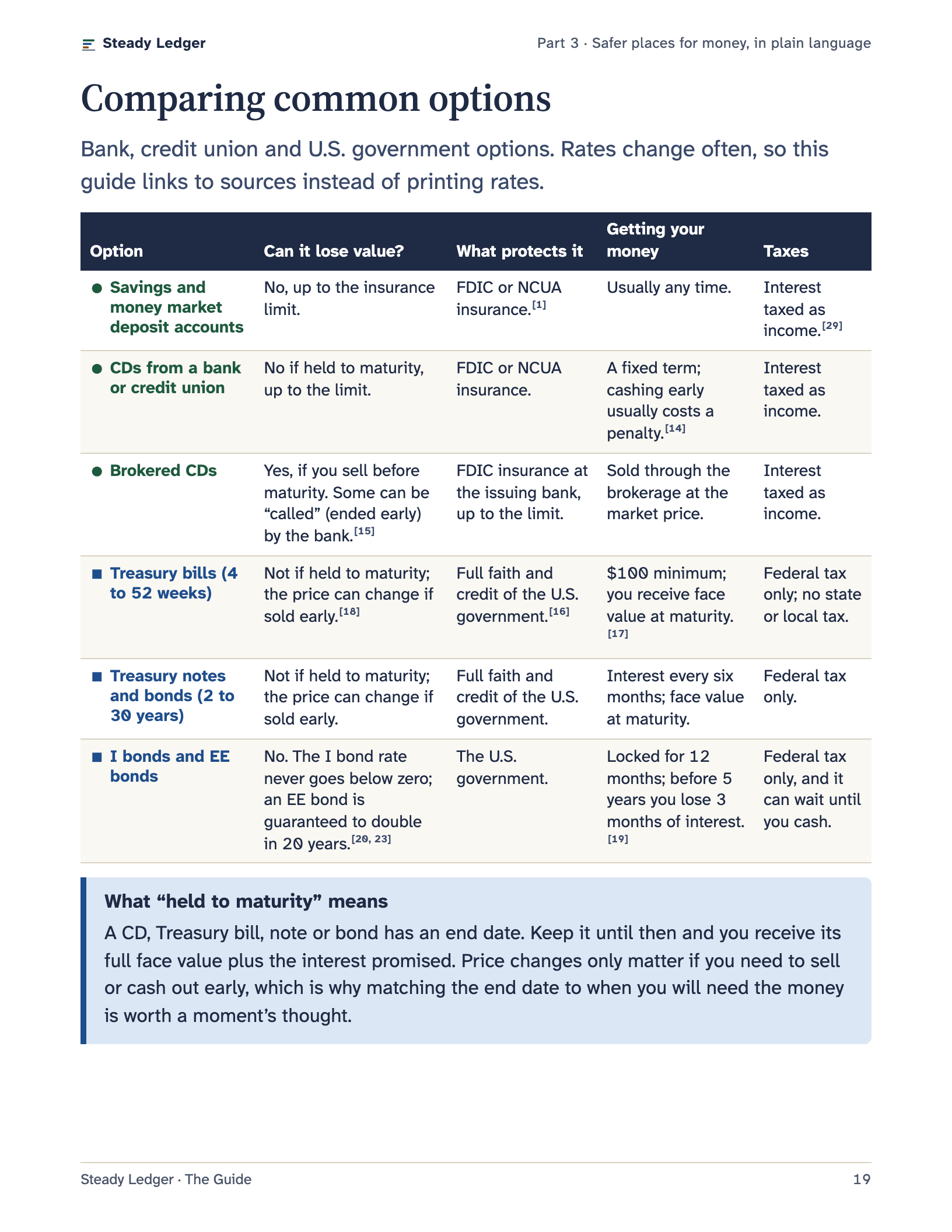
34 easy-to-read pages that explain what the workbook shows and what safer options really mean: insured deposits, CDs, Treasury bills, savings bonds, money market funds and dividends, without sales talk.
Every fact is checked against official sources such as the FDIC, NCUA, TreasuryDirect, SEC, FINRA and IRS, with dates, so you can see where it comes from. Examples use a clearly marked fictional household, and rates are never presented as offers.
- Your first 20 minutes, step by step
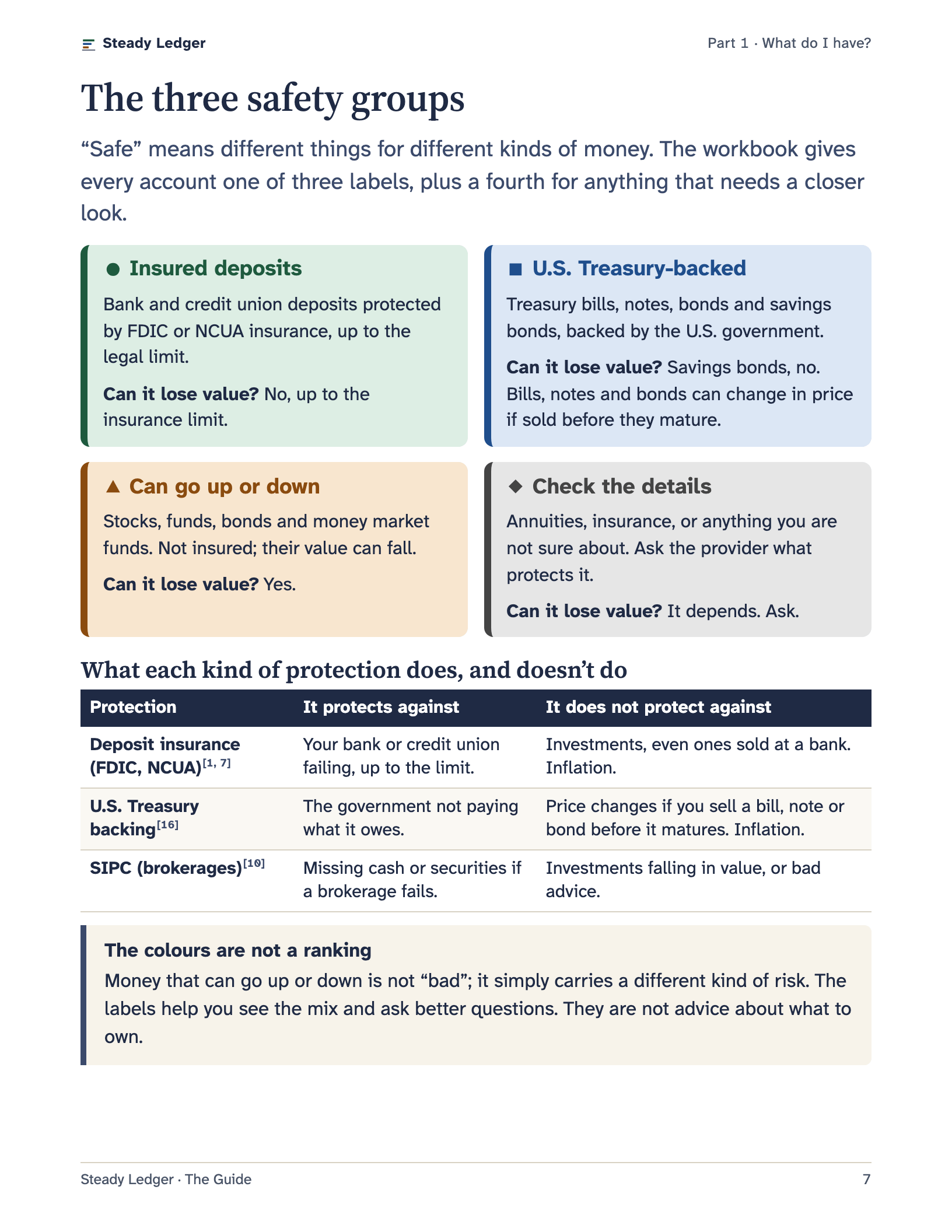
- How FDIC and NCUA insurance works, including ownership types
- Money at a brokerage: SIPC, sweep programs, money market funds
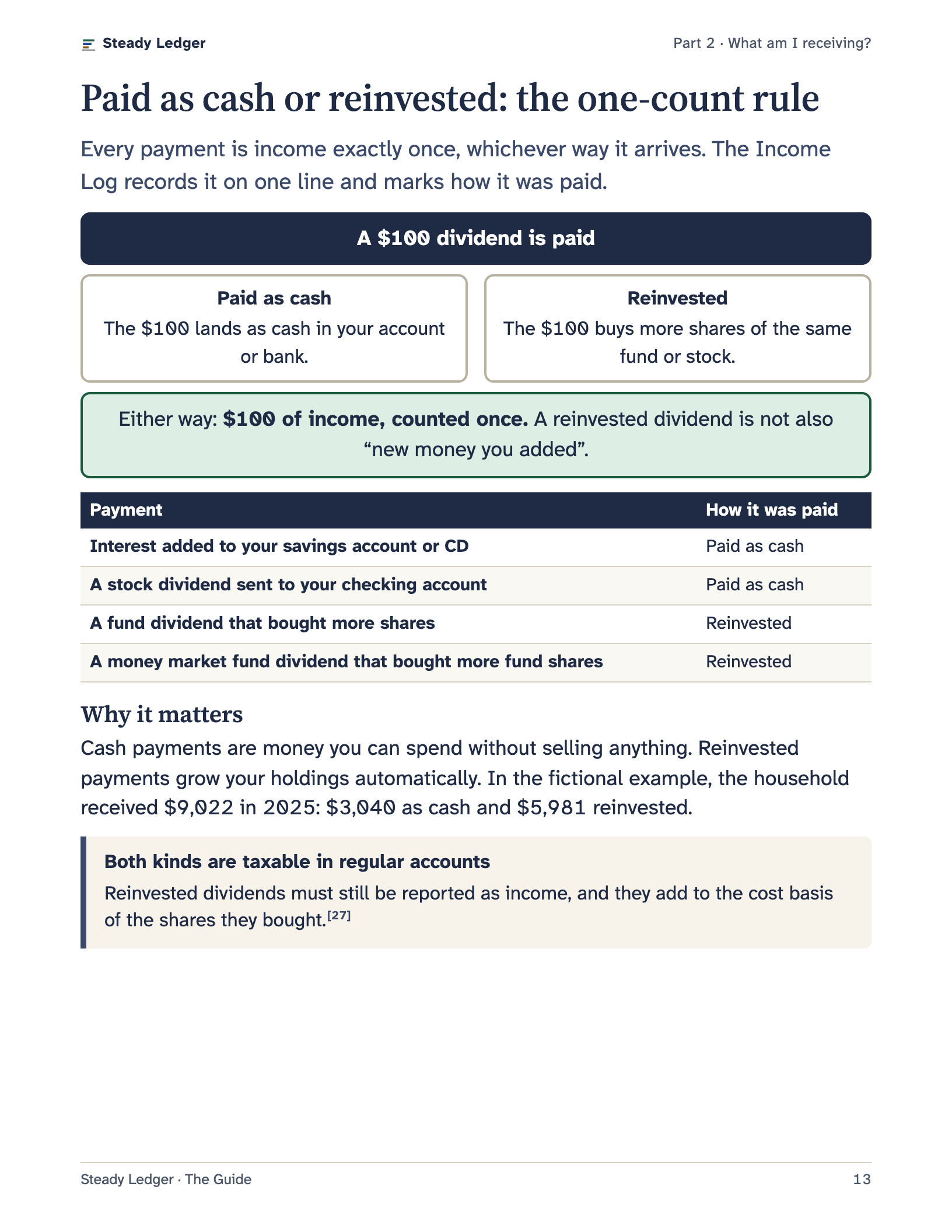
- Interest, dividends and distributions, and the one-count rule
- Rates and yields decoded: APY, dividend yield, total return
- At tax time: matching your records to 1099 forms
- Five questions for any place to keep money
- CDs, Treasury bills, ladders and savings bonds
- Inflation, goals and how money grows
- Red flags, where to check, and if someone needs to step in
- FDIC
- NCUA
- SIPC
- SEC
- FINRA
- U.S. Treasury
- IRS
- eCFR
- Consumer Financial Protection Bureau
What you get
5 files, delivered instantly by Gumroad.
00 Start Here
Two pages: what is in the kit, which file to open first, and your first 20 minutes.
Steady Ledger workbook (for your own numbers)
Excel workbook, 11 tabs. Opens in Microsoft Excel, Google Sheets and Apple Numbers.
Filled-in example workbook (fictional household)
The same workbook with 21 months of made-up records, so you can see every tab working.
The Steady Ledger Guide
Easy-to-read PDF in 13.5-point type, US Letter. How to use the workbook, and plain-language lessons on safer places for money. 34 pages.
Printable pages
Pen-and-paper versions of the main tabs, plus checklists. US Letter. 14 pages.
Is it right for you?
Made for you if
- Your savings and investments are spread across a few places, and you want one clear picture.
- You want to know what is insured, what is government-backed, and what can go up or down.
- You receive interest or dividends and want an honest record of them.
- You prefer plain language, and you would rather not link your bank to an app.
- You are helping a parent or partner get organized.
Probably not for you if
- You want accounts to update automatically from your bank.
- You trade often and need live prices or detailed tax-lot tracking.
- You are looking for stock picks or personal investment advice.
- You need lessons about rules outside the United States.
From purchase to your first Money Map
Buy securely on Gumroad
Pay by card or other methods Gumroad offers. Gumroad handles payment, receipts and any sales tax.
Download right away
Your download page opens after payment, and the receipt email has the link. The files stay in your Gumroad library.
Spend your first 20 minutes
Open the workbook, follow Start Here, and see your whole picture on one page.
One price. Yours to keep.
US$27One payment. No subscription.
Price in U.S. dollars. At checkout Gumroad may show the price in your local currency (you can switch back to USD) and adds sales tax or VAT where required.
Everything in the kit:
- A two-page Start Here sheet
- The Steady Ledger workbook, 11 tabs, for Excel, Google Sheets or Numbers
- A filled-in example workbook with a fictional household
- The 34-page plain-language guide
- 14 printable pages and checklists
- Download again any time from your Gumroad library
30-day refund
If Steady Ledger isn’t useful to you, ask for a refund within 30 days of purchase by replying to your Gumroad receipt or using Gumroad’s Contact option. You don’t need to give a reason or return anything.
Real help
Questions? Reply to your Gumroad receipt email, or use “Contact” on your Gumroad purchase page. We aim to reply within two business days. We help with the files; we don’t give personal financial advice.
Private by design
Your numbers stay in your file. No accounts to create, no bank logins, and no analytics or ad trackers on this site.
Questions
Is my information private?
Yes. Everything you type stays in your own file, on your own computer or storage. The workbook does not connect to the internet or to any bank, and we never see it. This website uses no analytics or ad trackers.
Does it connect to my bank?
No, by design. You type balances and payments yourself, about 15 minutes a month. Many people prefer that: no bank passwords shared with an app, and you notice what is happening with your money.
What do I need to use it?
Microsoft Excel, Google Sheets (free with a Google account) or Apple Numbers (free on Mac, iPad and iPhone). If you prefer paper, the printable pages work with a pen.
Can I use it on an iPad?
Yes. Open the workbook in Apple Numbers or the Excel app. A computer is more comfortable for typing a long list, but everything works on an iPad.
I’m not good with spreadsheets. Will I manage?
If you can type in a box and pick from a list, yes. Pale yellow boxes are for typing, everything grey fills itself in, and the Start Here tab walks you through your first 20 minutes. The filled-in example shows what every tab looks like.
Is this financial advice?
No. It is general education and a recordkeeping tool. It explains how things work and what to ask, but it does not tell you what to buy or sell, and it does not know your situation.
I’m not in the United States. Is it for me?
The guide explains U.S. accounts and rules (FDIC, NCUA, U.S. Treasury, IRS). The workbook itself works with any currency, but its insurance check uses the U.S. $250,000 limit.
How do I get the files?
Right after you pay, Gumroad shows a download page and emails you a receipt with the link. The files also stay in your Gumroad library, so you can download them again any time.
What if it isn’t right for me?
If Steady Ledger isn’t useful to you, ask for a refund within 30 days of purchase by replying to your Gumroad receipt or using Gumroad’s Contact option. You don’t need to give a reason or return anything.
Is it a subscription?
No. One payment, and the files are yours to keep.
Can my spouse or family use it too?
Yes. Your purchase covers you and your household. Please don’t share the files publicly.
Why does it say “U.S. Treasury-backed” and not just “safe”?
Because “safe” means different things. Deposit insurance protects against a bank failing. Treasury backing means the U.S. government pays what it owes. Neither protects against inflation, and neither applies to investments. Steady Ledger uses precise labels so you know which kind of protection you have.
Know what you have. Then decide what’s next.
Start with the free Money Map, or get the whole kit and be organized this afternoon.
General education, not personal financial advice. Examples are fictional; rates shown are illustrations.